I Built a Free Premiere Pro Panel That Checks Your Mix Against Delivery Spec
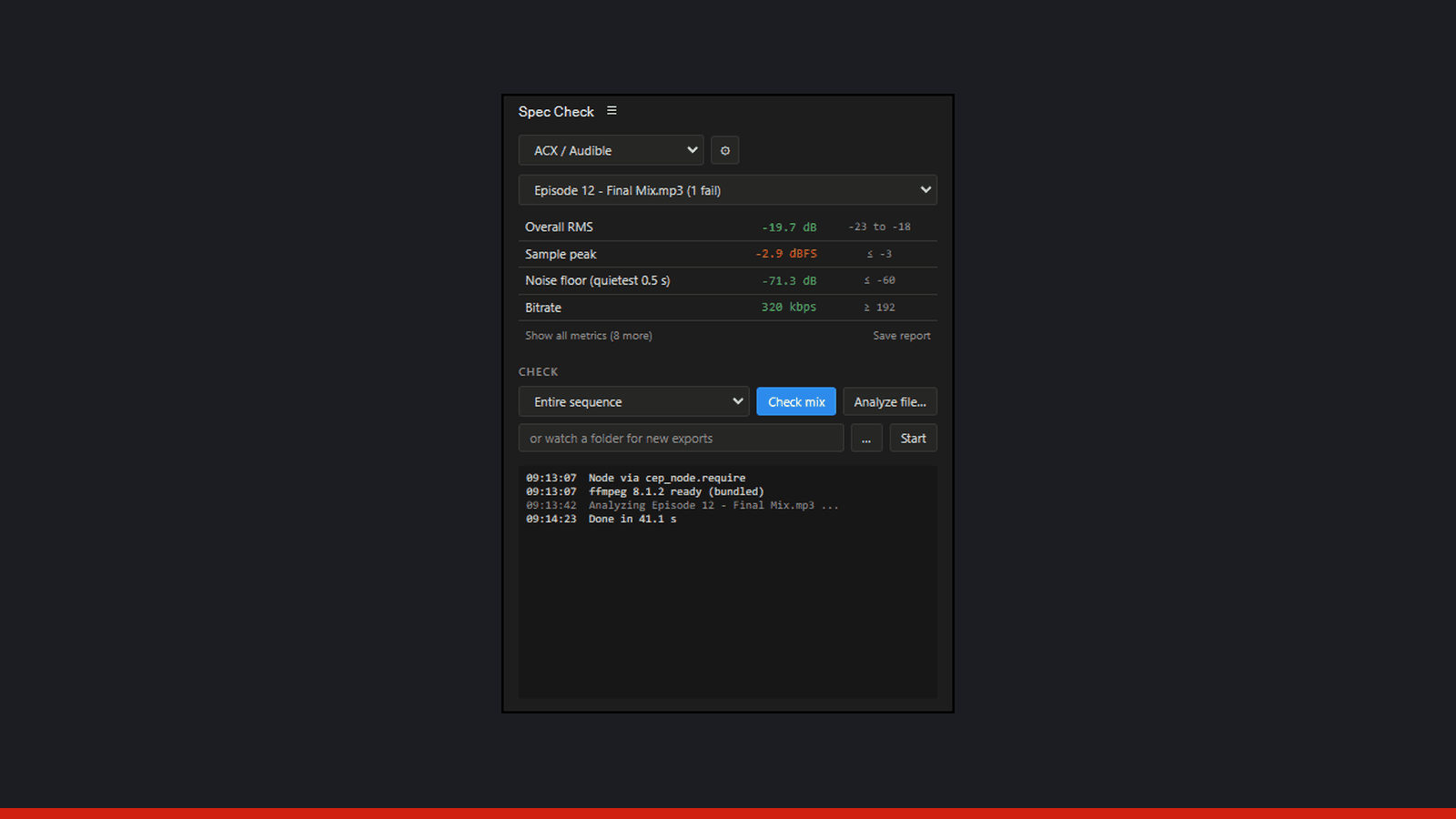
A few days ago I mixed and mastered a podcast episode for Audible Originals against a delivery spec sheet: an integrated loudness window, a true-peak ceiling, a noise floor limit, head and tail silence limits, and an exact file format. Premiere has no built-in way to confirm any of that. Checking meant exporting, then round-tripping the file into RX or a metering plugin to read each number by hand, one at a time.
I shipped that episode with a QC report I built manually, checking each measurement against the sheet before it went out. Somewhere in the middle of that process I decided this check should take one click every time from then on.
So I built it. It's called Spec Check, it's free, and it's open source (MIT) on GitHub.
What It Does
Spec Check is a panel that lives inside Premiere Pro and answers one question at a glance: does this mix pass the spec? Point it at a mix, pick a preset, and it hands back a pass/fail scoreboard for every metric the spec cares about. No more opening RX for a five-second peak reading or eyeballing a loudness meter and hoping.
Three Ways to Check a Mix
- Check mix: renders the active sequence's audio through Adobe Media Encoder (entire sequence, in-to-out, or work area) and analyzes the render
- Analyze file: drop or browse to an exported deliverable and measure the file you're about to send
- Watch folder: point it at an export folder and it watches recursively, auto-checking every new render as soon as the encoder finishes writing it
That last one is the one I use most. Queue a batch of exports, walk away, come back to a folder of files that have already been scored.
The Full Metric Set, Every Time
Every analysis computes the same complete set: integrated loudness (LUFS, ITU-R BS.1770), loudness range, true peak (4x oversampled), overall RMS, sample peak, noise floor, head and tail silence, sample rate, bitrate, channels, and duration. Noise floor is found automatically, the quietest half second of the program, no marker or setup required.
The measurement engine is ffmpeg, version-pinned, so the numbers match what the platforms themselves compute when they check your upload.
Presets Are Just Checklists
A preset is a set of pass/fail ranges laid over that same measurement set. Built-in presets cover ACX/Audible, Audible Originals, Apple Podcasts, Spotify, EBU R128 broadcast, and YouTube. For anything else, custom presets let you build a checklist for a specific client's spec sheet and save it.
Switching presets re-scores instantly, with no re-analysis, because the measurements are already cached from the first pass. Metrics a preset doesn't check still show on screen, greyed out instead of scored.
Save Report
One button writes a plain-text QC report next to the analyzed file: the preset, every check with its pass or fail, and the full measurement list underneath. I include these in client deliveries now instead of a note saying "checked and it's good."
Installing It
It's a signed .zxp, so installation is the same short list as any of my panels:
- Download the signed .zxp from Gumroad (free, or pay what you want)
- Open the .zxp with ZXP Installer
- Restart Premiere Pro
- Open it from Window > Extensions > Spec Check
- On first use, run the panel's ffmpeg setup (about 90 MB, downloaded with your consent, not bundled in the install)
It runs on Windows, Premiere Pro 22.0 and up.
Spec Check for REAPER
I also mix music in REAPER, so Spec Check now has a REAPER version. It works the same way: render the mix, measure it, and score it against a preset. It renders the master mix (the whole project, a time selection, or each region), measures integrated loudness and true peak with REAPER's own loudness engine, and restores your render settings when it's done.
The podcast and audiobook presets carry over, and there are music presets for Spotify, Apple Music, Amazon Music, and YouTube. For music, it also shows how much each streaming service will turn the track down or up, and it lists every clipped spot with its time, so you can jump straight to it or drop a marker there.
It's free and open source on GitHub. You install it through ReaPack by importing the repository link from the install guide, and it needs the ReaImGui extension, which ReaPack installs too. It runs on Windows.
Who This Is For
Anyone delivering podcast audio against a spec sheet benefits from this. Audiobook and Audible narrators checking ACX compliance before upload, podcast editors delivering to Apple Podcasts or Spotify, and anyone editing for a network or client with their own written spec all have the same problem: a number they need to hit and no fast way to confirm they hit it.
Spec Check also pairs with Sequence Batch Exporter, the other free panel I shipped for the same delivery workflow. Queue a batch with SBE, point Spec Check's watch folder at the output, and every deliverable gets verified as it lands instead of after the fact.
Why I Built It
I mix and master podcast audio every week, so a fast, repeatable QC check was my own problem before it was anyone else's. It also grew out of the same plugin development work behind Scout, my AI-assisted podcast editing extension for Premiere Pro, which is now available. Spec Check was the piece that could stand on its own and ship first.
If you deliver podcast or audiobook audio against a spec, grab it free from Gumroad. For a look at what else is coming out of that development work, check the dev page.
If you'd rather hand the whole mix and QC process to someone else, my podcast editing service delivers audio checked against your platform's spec before it ever reaches you.
Have an audio project?
Tell me what you are working on and I will point you the right way.
Written by

Trevor O'Hare
Podcast Editor & Producer
I'm Trevor O'Hare. I edit podcasts for a living, backed by more than 20 years in professional audio. If your show needs a steadier sound, or your week needs fewer editing hours, that's what I do. Flat rates start at $100 per episode.
Learning voiceover? I also teach at VOTrainer.com.