Scout Is Live: AI-Assisted Podcast Editing for Premiere Pro
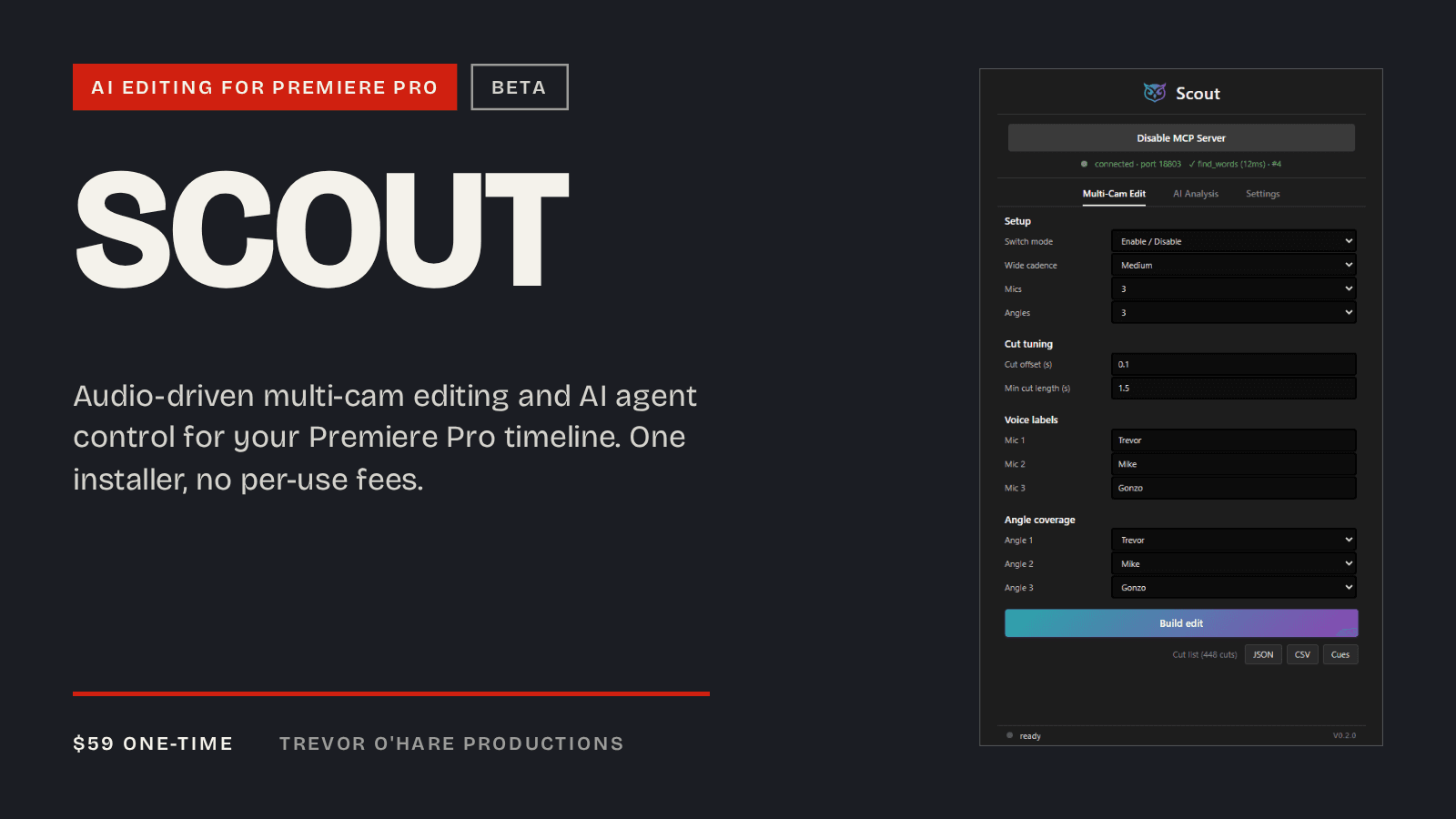
I edit podcasts for a living, and several of the shows I cut every week are multi-cam. The most repetitive part of that job is the camera cut: listening to three or four microphones, figuring out who's talking, and cutting to the right camera, over and over, for an hour of footage. I've done that cut by hand for years, across a lot of shows. Scout is what I built so I don't have to anymore.
Here's what it does, in 44 seconds:
Scout is a Premiere Pro extension I've been developing for months, and it's out of that development phase now. It's $59 one time on Gumroad, currently in beta, and I'm updating it regularly.
What Scout Does
Scout has two jobs. The first is audio-driven multi-camera editing: it reads the audio from each microphone in your sequence, finds who's actively speaking, builds a cut list from that, and applies it, cutting to the correct camera automatically. The second is connecting AI agents to your Premiere timeline, so you can hand editing tasks to an assistant that can see and act on your sequence.
Multi-Cam Edit
Point Scout at a multi-mic sequence and it listens to every channel, tracks who's active, and builds a cut list that follows the conversation. Applying that cut list runs in chunks with live progress on screen, and it recovers from partial failures instead of leaving you with a half-finished timeline. This is the part of the job I used to do manually, camera by camera, and it's the reason Scout exists at all.
AI Analysis, Built In
The panel includes a set of AI-driven analysis modes. Cleanup finds the low-value stretches of a recording, the dead air, the false starts, the ramble that goes nowhere, and lets you Lift or Extract them. Before any destructive cleanup runs, Scout backs up the sequence first, so a labeled backup copy shows up in your Project panel before anything gets cut.
Social Clips, Key Moments, B-roll Cues, and Quote Pulls all work the same way: point Scout at your sequence and it hands back results as timeline markers, CSV exports, or chapter markers, depending on what you're building next.
Bring Your Own AI
Scout doesn't charge a per-use fee for any of this. The panel works with an Anthropic API key or any OpenAI-compatible endpoint, including OpenAI itself, LM Studio, Ollama, or OpenRouter. Whatever AI subscription you already have does the analysis. Or skip the in-panel AI entirely and drive Scout from an MCP client instead, in which case it uses that client's model.
An MCP Server for Your Timeline
This is the part of Scout I'm most excited about. Connect Claude Code, Cursor, or any MCP client, and Scout gives it 277 tools for working directly in Premiere. The core editing set reads the active sequence and the full transcript, searches spoken words with frame-accurate timecodes (the same result you'd get clicking a word in Premiere's Text panel), places and removes markers, applies cleanup edits, converts marker ranges to chapter markers, exports markers to CSV, cuts the timeline at exact times with full undo support, and re-enables all clips. The rest of the set reaches across the program: effects, transitions, exports, project and bin management, track targeting, and metadata.
Once that connection exists, editing turns into a conversation. Ask your agent to find every tangent in the episode and mark it. Ask it to cut everything before the cold open. It reads the timeline, does the work, and you review the result inside Premiere like you would any other edit.
The Best of Both Premiere Platforms
Premiere has two extension platforms, and Scout uses both. The modern UXP side reads the transcripts Premiere itself creates, word-level timing included. Extensions built only on the older CEP platform can't see those transcripts and need a separate transcription service bolted on to get text. CEP still covers editing capabilities UXP doesn't offer yet, so Scout carries both and uses the right one for each job. Transcribe once inside Premiere, and your agent already has everything it needs.
Installing It
Scout runs on Windows, on Premiere Pro 26.2 or newer, and works offline once activated.
- Buy Scout on Gumroad, $59 one time
- You'll get a license key by email
- Run the installer, which sets up the panel, the connection to your MCP client, and every other piece in one pass
- Open the panel and go to Settings > License > Activate, then enter your key
Who This Is For
If you edit multi-cam podcast video every week, Multi-Cam Edit alone earns back the time it took to read this post on your first episode. If you're already using an AI coding assistant for other work, the MCP server means that same assistant can now edit video for you. If you want a faster way to find the moments worth clipping out of a long recording, the AI Analysis modes do that without any agent setup at all.
Scout grew out of the same work behind the free panels I've shipped this year: Sequence Batch Exporter and Spec Check. If you're curious what's involved in building for Premiere's newer extension platform, I wrote up some of what I learned in what the plugin docs don't tell you. All of it, paid and free, lives on the dev page, where you can also sign up for release updates.
Scout is $59, one time, on Gumroad. Buy it, cut your next episode with it, and tell me what to build next.
If you'd rather hand the whole edit to someone else, my podcast editing service is still there, and now some of that work runs through Scout on my end too.
Have an audio project?
Tell me what you are working on and I will point you the right way.
Written by

Trevor O'Hare
Podcast Editor & Producer
I'm Trevor O'Hare. I edit podcasts for a living, backed by more than 20 years in professional audio. If your show needs a steadier sound, or your week needs fewer editing hours, that's what I do. Flat rates start at $100 per episode.
Learning voiceover? I also teach at VOTrainer.com.