I Built a Free Premiere Pro Plugin That Batch Exports Podcast Episodes
Every podcast episode I edit needs to leave Premiere in at least two formats. Video for YouTube, audio for the podcast feed. Sometimes a third for a client's raw archive. Premiere exports one sequence to one preset at a time, so every episode meant opening the export dialog two or three times and babysitting the queue.
I looked at the batch export tools already out there and most of them solve a different problem: exporting the same sequence with different track combinations turned on or off. That's built for multi-language versions or alternate cuts. Podcast delivery needs something plainer: one sequence, several formats, one click.
So I built it. It's called Sequence Batch Exporter, it's free, and it's open source (MIT) on GitHub.
What It Does
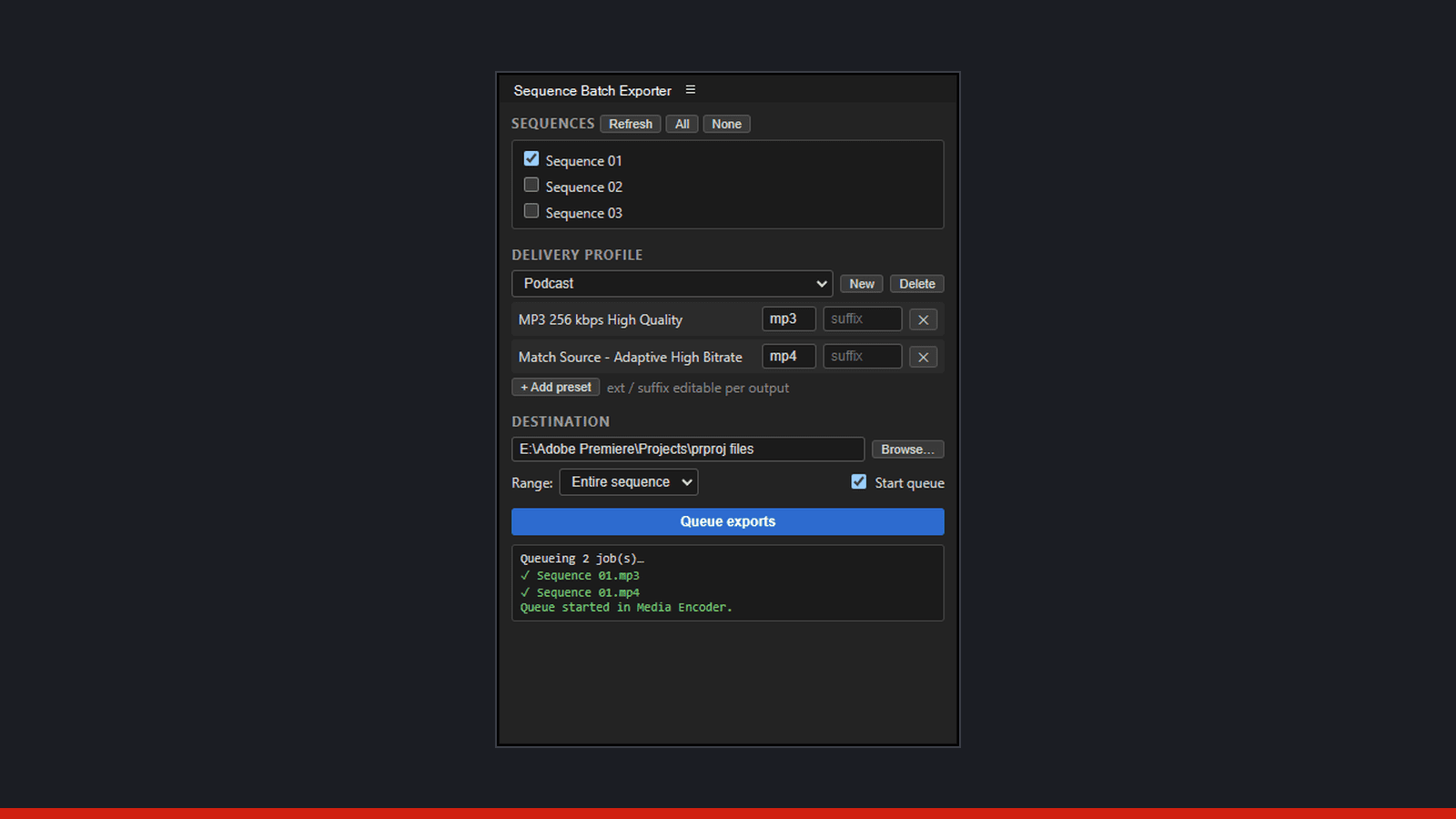
Sequence Batch Exporter is a panel that lives inside Premiere Pro. Pick your sequences, pick your export presets, and it queues every combination to Adobe Media Encoder in one pass. Ten episodes times two formats is twenty exports queued in seconds instead of built by hand one at a time.
Output files are named `<sequence name><suffix>.<extension>`, so your episode titles carry straight through to the delivered files without any renaming step afterward.
Delivery Profiles
The part I use daily is delivery profiles. A profile is a named bundle of outputs, each one a preset plus a file extension and an optional filename suffix, and it's saved between sessions.
My own "Podcast" profile has two outputs built in: MP3 at 256 kbps for the audio feed, and Match Source MP4 for the video version. I load that profile, select the sequence, and both formats queue together. No rebuilding the export list every week.
Finding Presets Without Opening Media Encoder
Premiere ships with roughly 540 export presets, plus whatever you've built yourself. Normally, finding the right one means digging through Media Encoder's preset browser. Sequence Batch Exporter has a searchable preset picker built into the panel, so every system and user preset is one search away. Star the ones you use often and they pin to the top of the list.
Destination and Range Controls
Beyond preset selection, the panel gives you control over where files land and how much of the sequence goes out:
- Output folder: defaults to your project folder, or point it anywhere
- Range: entire sequence, in/out points, or the work area
- Auto-start: kick off the Media Encoder queue automatically once the batch is built
Installing It
It's a signed .zxp, so installation is straightforward:
- Download the latest release from the GitHub releases page
- Open the .zxp with ZXP Installer
- Restart Premiere Pro
- Open it from Window > Extensions > Sequence Batch Exporter
It runs on Windows, Premiere Pro 22.0 and up.
Who This Is For
Anyone editing in Premiere who has to deliver the same cut more than one way benefits from this. Podcast editors delivering audio and video from the same session are the obvious case, since that's my own weekly workflow. Video producers who need a client cut plus a social cut plus an archive master have the same problem in a different shape. So do editors juggling clients who each want their own preset and their own naming convention. Delivery profiles solve that too: build one profile per client, and switching between them takes a click.
If your export routine involves more than one trip through the Media Encoder queue per project, this is built for that exact moment.
Why I Built It
I edit podcasts every week, so this was my own delivery pain before it was anyone else's. It also grew directly out of learning Premiere plugin development while building Scout, an AI-assisted podcast editing panel for Premiere Pro currently in development. Sequence Batch Exporter was the smaller, self-contained piece that could ship on its own while Scout keeps cooking.
If you edit podcasts, or any project that needs the same cut delivered in multiple formats, grab it free from the GitHub releases page. And if you want a look at what else is coming out of that development work, check the dev page.
If you'd rather hand the whole editing process to someone else, my podcast editing service covers delivery in every format your show needs, batch exporter included.
Have an audio project?
Tell me what you are working on and I will point you the right way.
Written by

Trevor O'Hare
Podcast Editor & Producer
I'm Trevor O'Hare. I edit podcasts for a living, backed by more than 20 years in professional audio. If your show needs a steadier sound, or your week needs fewer editing hours, that's what I do. Flat rates start at $100 per episode.
Learning voiceover? I also teach at VOTrainer.com.